
To find out how to access the Omnis trilogy video guides on our website and how to download the Omnis Beginners, Intermediate and Advanced Manuals, please watch the following video or refer to the written steps just below the video:
A. Steps To Access Your Video Courses
STEP 1, Log in to your account
Navigate to https://www.qxworld.eu/login/ and use your account credentials to log in.
STEP 2, Go to your courses and find the guide series
Navigate to My QX > My courses in the top right corner, then click the magnifier icon to search for the 'Beginners guide' keywords.
You will find the course titled 'OMNIS Unveiled: Step into the Fusion of Holistic Health & Science Beginners Guide'. Clicking the title will bring you to the course page.
STEP 3, Navigate the course page
You will now be able to access the course contents, sorted by the day and the topic.
B. Steps To Get Your Digital Manuals
STEP 1, Create your free Adobe account
This will create a free Adobe account you can use to access your books.
STEP 2, Install Adobe Digital Editions for your device
You will need to use the Adobe Digital Editions reader app to view your books.
Download Digital Edition Windows
Download Digital Edition Macintosh
For more device options, please visit Adobe Digital Editions download page.
Please make sure not to select Install MacAfee Antivirus during the install process, this antivirus program may cause some issues with our software.
After installing Adobe Digital Editions,
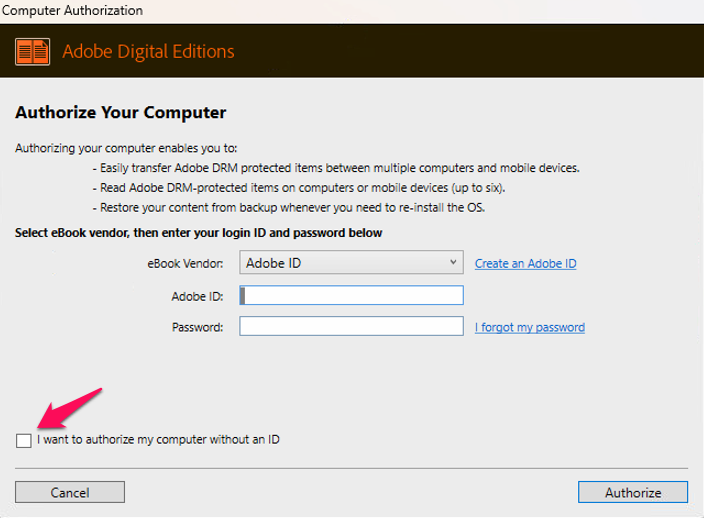
Open Adobe Digital Editions, then go to Help, select Authorize Computer, then log in with your Adobe account login as created in STEP 1:
Ensure "I want to authorize my computer without ID" is NOT ticked, since this will limit the installation of the manual to a single computer, instead of allowing use on 6 different devices or future computer.
STEP 3, Download your book access file from your download menu
Retrieve your book access file through the My QX / My downloads from our website. Once downloaded, open the ACSM file with Adobe Digital Editions to start enjoying the manuals.
Comments
0 comments
Article is closed for comments.